One panel.Every trade.
Size·Manage·Pyramid·Protect
Drag your stop on the chart and SizerX sizes the trade from your risk instantly. Then it manages the position, builds pyramid layers and guards the account, all from one panel.
Fully testable in the Strategy Tester. The free demo includes every feature.
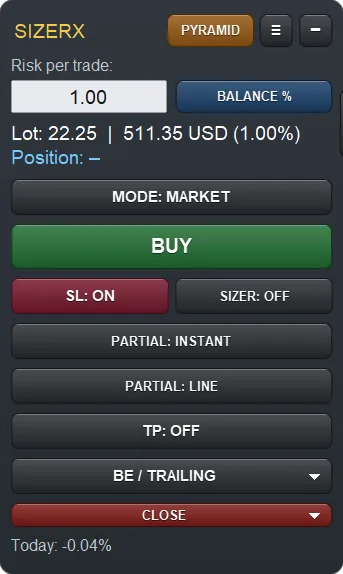
- Platform
- MetaTrader 5
- Risk modes
- Balance % · Equity % · Amount $
- Trade management
- Break-even, partial close, 4 trailing types
- Account guard
- Daily loss limit, prop firm mode
- Try before you buy
- Free demo · buy or rent on MQL5
See every feature on a real chart.
A complete walk through SizerX in MetaTrader 5: sizing, trade management, the pyramid and account protection.
Drag the stop. Read the lot.
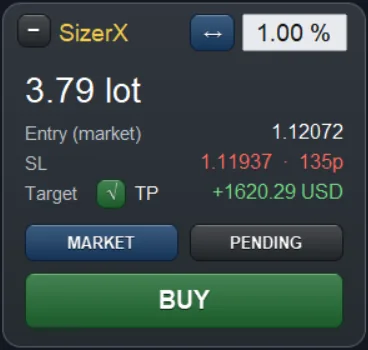
Type your risk once. Move the stop loss line on the chart and the lot size follows it live, with every number on the planner card before you open the trade.

Three ways to set it
Percent of balance, percent of equity, or a fixed amount in your account currency.
The lot follows the line
Below the price it is a buy, above the price a sell. Lots are rounded to your broker's lot step.
Every number before you click
Entry, stop distance in points and the result at your target. The net R:R sits above the green zone.
Enter at your price
SizerX picks limit or stop for you. With OCO it places a second order on the other side and deletes the one that does not fill.
Counted in, both sides
Enter your commission and SizerX includes it in the lot size and in the R:R, so the loss at your stop is the risk you set.
Plan the exit. SizerX runs it.
Break-even, partial close, take profit and trailing stop work from lines you place on the chart. You set the plan, SizerX carries it out.

Three states, no surprises
Every tool is a line: off, plan or active. A line you drag by accident goes back to plan and cannot trigger.
Auto or right now
Arm a break-even line or move the stop to entry with one click, with commission included if you want.
Instantly or at a line
Close a set percentage now or when the price reaches your line. The label shows what the closed part banks in R.
Four ways to follow the price
Moves your real stop at the broker, only in your favour. Its timeframe can differ from the chart, for example M5 trailing on M1.
Two trades per chart
Each position keeps its own break-even, partial, take profit and trailing settings.
Add layers. One common stop.
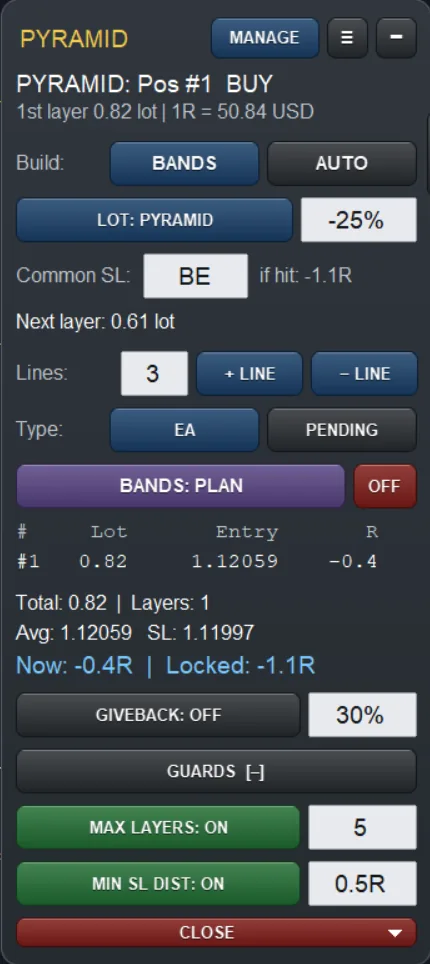
Add new positions only while the trade is going your way. Each layer moves one common stop for the whole pyramid, so your original risk does not grow.

Bands or auto
Place band lines where new layers should open, or let AUTO add a layer on a candle close or a breakout after a pullback.
Set as a result, not a price
Choose where the whole pyramid ends if the stop is hit: break-even, −1R, +0.5R. It only moves forward.
Pyramid, fixed or risk
Smaller layers each time, the same size every time, or sized from the result already locked in.
Limits you set once
A maximum number of layers, a minimum stop distance, and a giveback rule that closes the pyramid if it returns a set part of its best result.
The pyramid module needs a hedging account. On netting accounts SizerX tells you at start.

Rules that hold on a bad day.
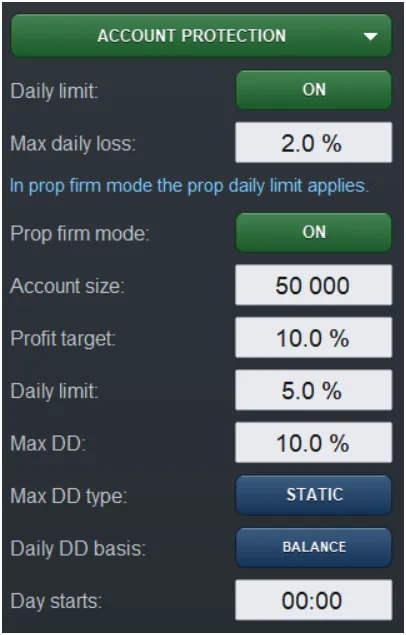
Set the limits once in the Settings card. SizerX watches the whole account and acts before a limit is reached, not after.
Daily loss limit
Acts at 90% of your limit: it closes every position on the account, deletes pending orders and locks trading for the rest of the day.
Prop firm mode
Enter your challenge rules: account size, target, daily limit and max drawdown, static or trailing. Two bars on the panel show the room you have left.
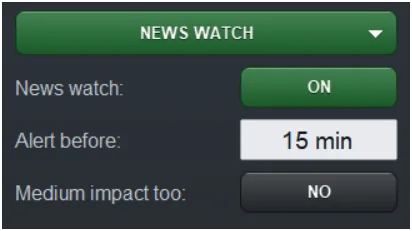
News watch
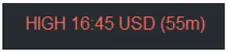
The next high-impact event from the MT5 calendar sits on the panel, with an alert before it and a warning if you have open positions.
Built-in safety
Positions are recovered after a restart. A click on the panel never reaches the chart. Two copies cannot manage the same trades.
Six tools. One panel.
What usually takes several separate tools on one chart, each with its own settings and its own window, is one panel in SizerX.
- UsuallyPosition size calculator→01 Size
- UsuallyTrade manager: break-even, partials, trailing→02 Manage
- UsuallyPyramid or scaling-in tool→03 Pyramid
- UsuallyDaily loss limiter→04 Protect
- UsuallyProp firm rule guard→04 Protect
- UsuallyNews alert→04 Protect
- In SizerX→One panel
Get the link by email and try the demo on your PC.
New SX tools and updates, straight to your inbox.
The free demo runs in MetaTrader 5 on a computer. Leave your email and we send you the link, so you can try it at your desk.
A short email when a new tool or an update comes out. No spam, unsubscribe any time.
Pro tools for MT5.
Paid tools built with the same care as SizerX. Each one has its own colour, all of them carry the SX mark.
◆ More indicators and Expert Advisors are in development.
Free tools.
Indicators we built for our own trading and share for free. They never open, change or close trades.
Read the guide in five parts.
The full SizerX user guide on the MQL5 blog, from installation to the last setting.
- PART 1Getting StartedInstallation, the first inputs and your first trade.↗
- PART 2The Panel, the Lines and the Planner CardRisk modes, views and themes, what R means.↗
- PART 3Managing the TradeBreak-even, partial close, take profit and trailing.↗
- PART 4Pending Orders, OCO and the Pyramid ModuleBands, auto mode, lot modes and guards.↗
- PART 5Account Protection, Settings, Commission and FAQDaily limit, prop firm mode, news watch, hotkeys.↗
Questions and answers.
Something missing? Write to support@sizerx.io.
Can I try SizerX before I buy?
Yes. Download the free demo from the MQL5 Market and run it in the visual Strategy Tester in MetaTrader 5. Every feature is included. The tester does not allow dragging lines with the mouse, so SizerX adds a small row with arrow buttons to move them.
Does it work on MetaTrader 4?
No. SizerX is made for MetaTrader 5 only.
Does SizerX decide when to trade?
No. It is a risk and trade management tool, not a signal service. You choose every entry. SizerX sizes the trade from your risk and carries out the rules you set with the lines on the chart.
Can I use it on a prop firm account?
Yes. Prop firm mode follows your challenge rules: daily limit, max drawdown and target. Check first that your prop firm allows Expert Advisors on your account type. If it does not, the free Sizer Planner indicator shows the lot size and the numbers, and you enter the trade yourself.
Does MetaTrader need to stay open?
Partial close, take profit and the OCO cancellation are carried out by SizerX, so MetaTrader must be running. Break-even and trailing move the real stop at your broker, but their next steps also need SizerX running. If you hold trades with your PC off, use a VPS.
Does it work on a netting account?
Yes, except the pyramid module, which needs a hedging account because each layer is a separate position.
Is my broker's commission counted?
Yes, if you enter it. SizerX then includes it in the lot size, the R:R and, if you choose, the break-even level.
How do I buy or rent it?
On the MQL5 Market, from the SizerX product page. You can buy it or rent it monthly. MetaTrader 5 installs it for you.
Try every feature.
Free, in the tester.
Free demo · buy or rent on the MQL5 Market. Trading involves risk. SizerX is a risk and trade management tool and does not promise any result.